Sambil
How to connect RedBox to Sambil so every sale from your store in the mall is reported automatically, what data is sent and when.
If your store operates inside Sambil Santo Domingo, the mall asks you to report your sales. With this integration you don't have to do it by hand: RedBox sends every closed sale straight to Sambil's sales system, a few minutes after it closes.
Before you start
- An active paid license. Integrations unlock with it.
- The
Administrar integracionespermission on your user. - Your store's credentials from Sambil: a client ID and a secret. Each store has its own; if you run several stores, Sambil gives you one pair per store.
The secret is shown only once
Sambil shows the full secret only when it is created. Keep it somewhere safe until you paste it into RedBox. If it is lost, Sambil has to generate a new one.
Setting it up
Save your credentials
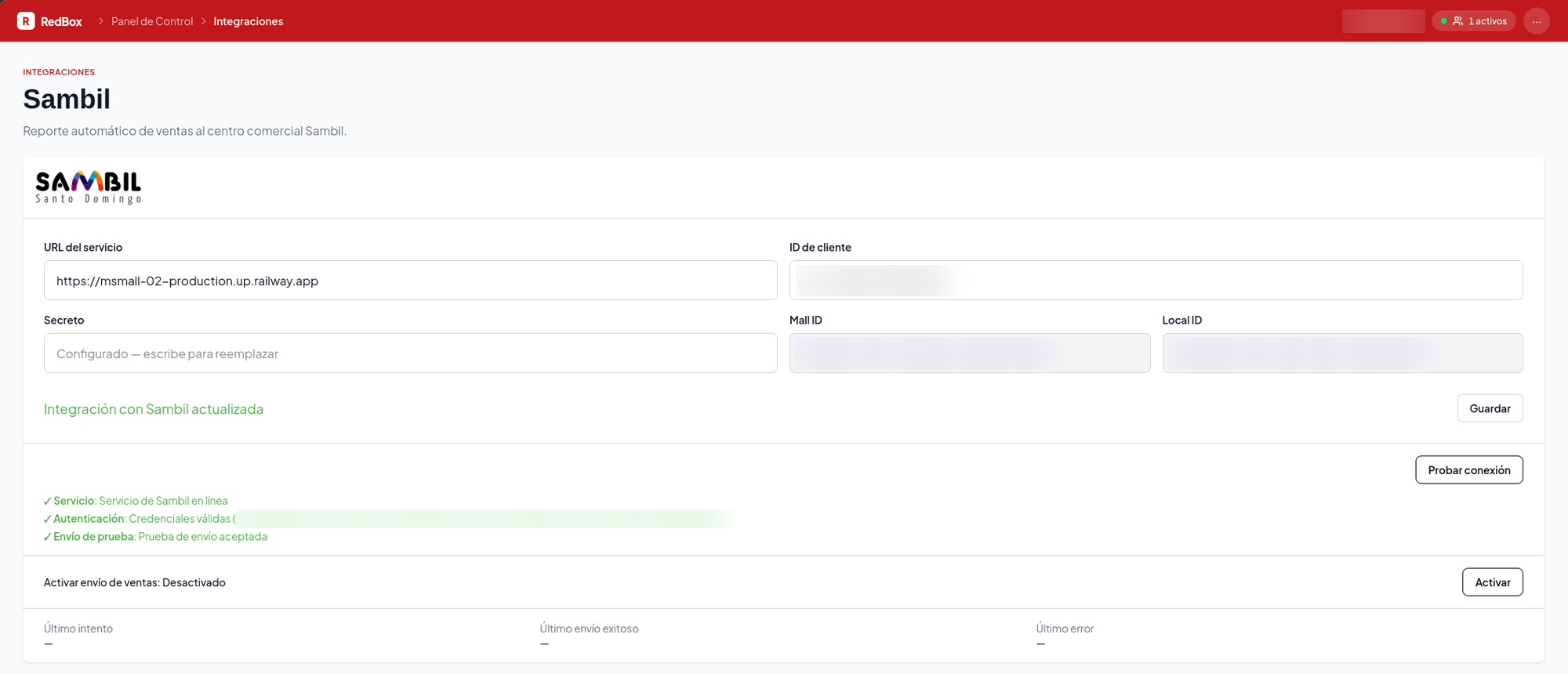
Go to Integraciones → Sambil, paste the client ID and the secret, and press Guardar. The service URL is already filled in with Sambil's address; don't change it unless Sambil tells you to. If you change the URL, you will have to enter the secret again.
Test the connection
Press Probar conexión. RedBox checks three things, in order:
| Step | What it checks |
|---|---|
| Servicio | That Sambil's system is online |
| Autenticación | That your credentials are valid, and which mall and store they belong to |
| Envío de prueba | That Sambil accepts submissions from your store |
The test submission does not record any sale: it is sent empty and flagged as a test. Once it passes you will see the Mall ID and Local ID Sambil associates with your credentials. Confirm they match your store.
Turn on sales reporting
With the test passed, press Activar. From that moment on, every sale you close is reported to Sambil.
Reporting starts when you turn it on, not before
Sales closed before you turned the integration on are not sent. If Sambil needs earlier sales, write to us.
What is sent
For each closed sale, RedBox sends one line with these fields and nothing else:
| Field | Where it comes from |
|---|---|
| Document type | Always factura |
| Document number | The order number followed by an internal identifier, e.g. 000123-4589123 |
| Sale date | The sale's business day, the same one your sales-by-day report uses |
| Sale time | The closing time, in your establishment's time zone |
| Gross total | What the customer was charged |
| Tax total | ITBIS plus the legal service charge, when it applies |
| Net total | The gross total minus taxes |
No customer, product or payment data is sent. Voluntary tips are not part of any total: they belong to your staff, not to the store's sales.
Why does the document number have two parts?
If you have several terminals, two of them can use the same order number on the same day. Sambil identifies each sale by its number, so RedBox appends an internal identifier that never repeats. The first part is still the number on the receipt, so you can find the sale.
When it is sent
Sales go out on their own, a few minutes after closing. If a sale that was already sent changes later — say a discount or an amount is corrected — RedBox sends it again with the same document number, and Sambil updates the sale instead of duplicating it.
If Sambil is unavailable at that moment, nothing is lost: RedBox tries again on the next run, starting from the same sale.
Rejected sales
Sambil can reject a specific sale, for example because of a field it does not accept. When that happens, RedBox keeps sending the rest of your sales and puts the rejected one in the Ventas rechazadas list at the bottom of the Integraciones → Sambil page. The list only appears while there are rejected sales and shows, for each one:
- The document, with a link to open the order.
- The closing time and the total.
- Sambil's message explaining the rejection.
- The number of attempts so far.
A rejected sale is not sent again on its own until the order changes. If you fix the order, RedBox sends it again on the next run. You can also act from the list:
| Action | What it does |
|---|---|
| Reintentar | Sends that sale to Sambil right now and shows you the answer. If Sambil accepts it, it leaves the list |
| Reintentar todas | Retries the rejected sales, up to 50 at a time, oldest first. If more remain, press it again. If it takes too long it stops and tells you how many are left |
| Descartar | Removes the sale from the list. It will not be sent to Sambil unless the order changes later |
Retrying is only available while sales reporting is on: if it was turned off, fix the cause, turn it back on and then retry.
Automatic pause
If Sambil keeps rejecting sales —3 sales in a row, 5 times in a row, without accepting any sale in between— it is a sign that Sambil is refusing everything your store sends, not just one sale. In that case RedBox turns off sales reporting so it stops trying. While it is off, your sales keep closing as usual and nothing is lost. When you turn it back on, RedBox continues from where it stopped, including the sales closed during the pause.
When this happens, the Integraciones → Sambil page shows a red box next to the Activar button with the message "Envío de ventas desactivado tras 5 intentos seguidos con ventas rechazadas por Sambil", and while the count is building you will see "Intentos seguidos con rechazos: N de 5". Check Sambil's message in the rejected sales list, fix the cause (sometimes only Sambil can) and press Activar.
Get notified when it turns off
To find out without opening the page, go to Integraciones →
Notificaciones and create a notification for the event
integrations.sambil.disabled (in the Integraciones section, with the
SAMBIL tag; the email is titled "Sambil: envío de ventas desactivado"). You
can receive it by email or by webhook.
Integration status
Below the reporting switch you will see:
| Field | What it shows |
|---|---|
| Último intento | When RedBox last tried to send sales |
| Último envío exitoso | When Sambil last confirmed a submission |
| Último error | The latest problem, with Sambil's message and, if it rejected sales, their document numbers. Rejected sales also stay in the Rejected sales list |
Troubleshooting
Need help?
Write to us if Sambil asks you about your submissions, or if anything on this page doesn't match what you see.